
How do I change my character's appearance?
You can change your character's appearance in the wardrobe. To do this, press your avatar.
❗ Please note that the character settings window will become available as you progress through the story. In the character settings window, you can change your character's face and clothing.
What is the wardrobe?
The wardrobe is the place where you can change both your character's appearance and their outfit. ✨
The wardrobe consists of three tabs:
👕 The Closet tab is where your looks are kept.
☺️ The Customization tab is where you can change your character's appearance.
🛍 The New Collection tab is where you can get new clothes and accessories.
👕 The Closet tab is where your looks are kept.
☺️ The Customization tab is where you can change your character's appearance.
🛍 The New Collection tab is where you can get new clothes and accessories.
How do I put clothes or accessories on my character?
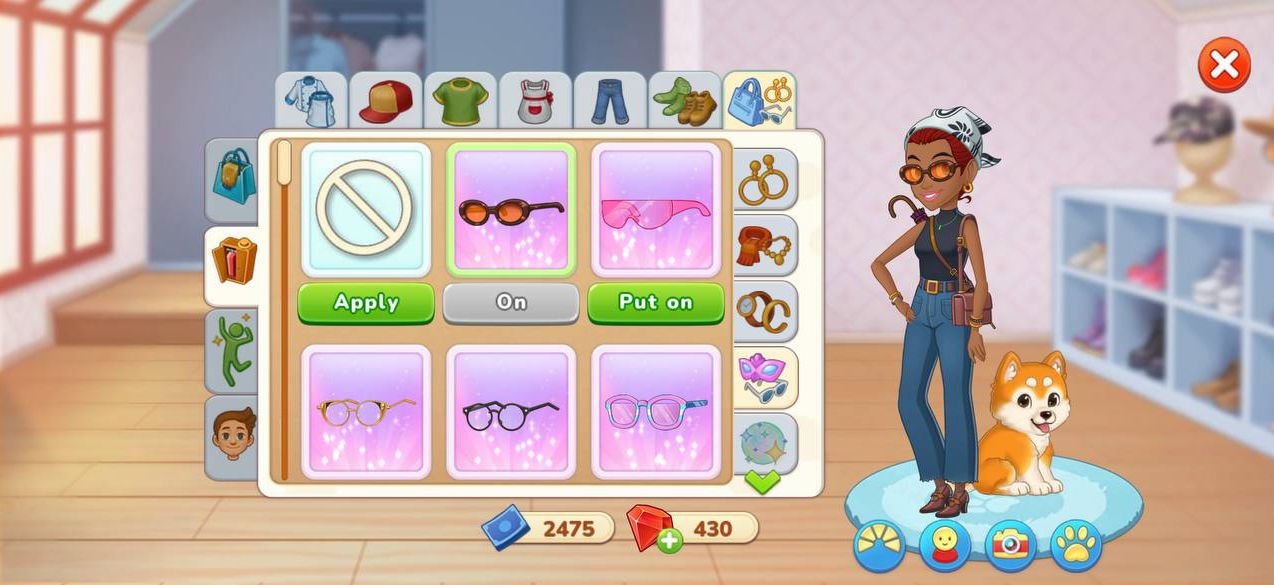
All of your looks are kept in the wardrobe's Closet tab. 👕
The Closet tab divides your looks into categories and subcategories.
✨ Navigate to the corresponding tabs to choose clothes or accessories that you want to mix and match together.
The Closet tab divides your looks into categories and subcategories.
✨ Navigate to the corresponding tabs to choose clothes or accessories that you want to mix and match together.
To use an item of clothing or an accessory, press the item you want.
To put an item of clothing or an accessory on, press the Put on button.
To put an item of clothing or an accessory on, press the Put on button.
📍 Please note that you can mix and match certain accessories with each other and pair them with clothes.
Every look you receive will automatically be sorted into the wardrobe's categories and subcategories.
Every look you receive will automatically be sorted into the wardrobe's categories and subcategories.
Where can I get new clothes?
You can get new clothes:
- In the New Collection tab
- In the special Tasty Offer
- In the Food Truck event, as you progress
- By purchasing a Golden Ticket.
- In the special Tasty Offer
- In the Food Truck event, as you progress
- By purchasing a Golden Ticket.